How to Build an AI Agent-Friendly Website: The Complete 2026 Playbook
An AI agent-friendly website goes beyond accessibility. Learn the full 2026 stack: Google's checklist, WebMCP, llms.txt, schema markup, and AI crawler configuration.
TL;DR
An AI agent-friendly website is built on five layers: semantic HTML foundations, crawler access configuration, structured data, emerging agent protocols, and a prioritized action plan. Google's 7-point checklist covers layer one. This guide covers all five, including the data showing that accessible sites achieve 78% agent task success vs. 42% for inaccessible ones, and schema markup drives 3.1x more AI citations.
UC Berkeley and University of Michigan researchers found that AI agents complete tasks on accessible websites 78% of the time. On inaccessible sites, that drops to 42%. That's not a marginal difference. It's the gap between getting recommended by ChatGPT and getting ignored.
Google published their agent-friendly website guide in 2026 with a clean 7-point checklist. Most brands read it, fixed a few buttons, and moved on. But Google's checklist is the floor, not the ceiling. It covers HTML structure and says nothing about crawl directives, structured data for LLMs, or the protocols that let agents interact with your site as a tool.
We've audited dozens of websites for AI visibility. The pattern is consistent: brands that treat agent-friendly design as a checkbox exercise get partial results. Brands that build the full stack (HTML foundations, crawler access, schema markup, and protocol readiness) see measurably higher citation rates and AI recommendation frequency.
This is the complete guide to all five layers.
What Makes a Website "AI Agent-Friendly" in 2026?
An AI agent-friendly website is one that AI systems can perceive, navigate, and take actions on through screenshots, DOM parsing, and the accessibility tree without human help.
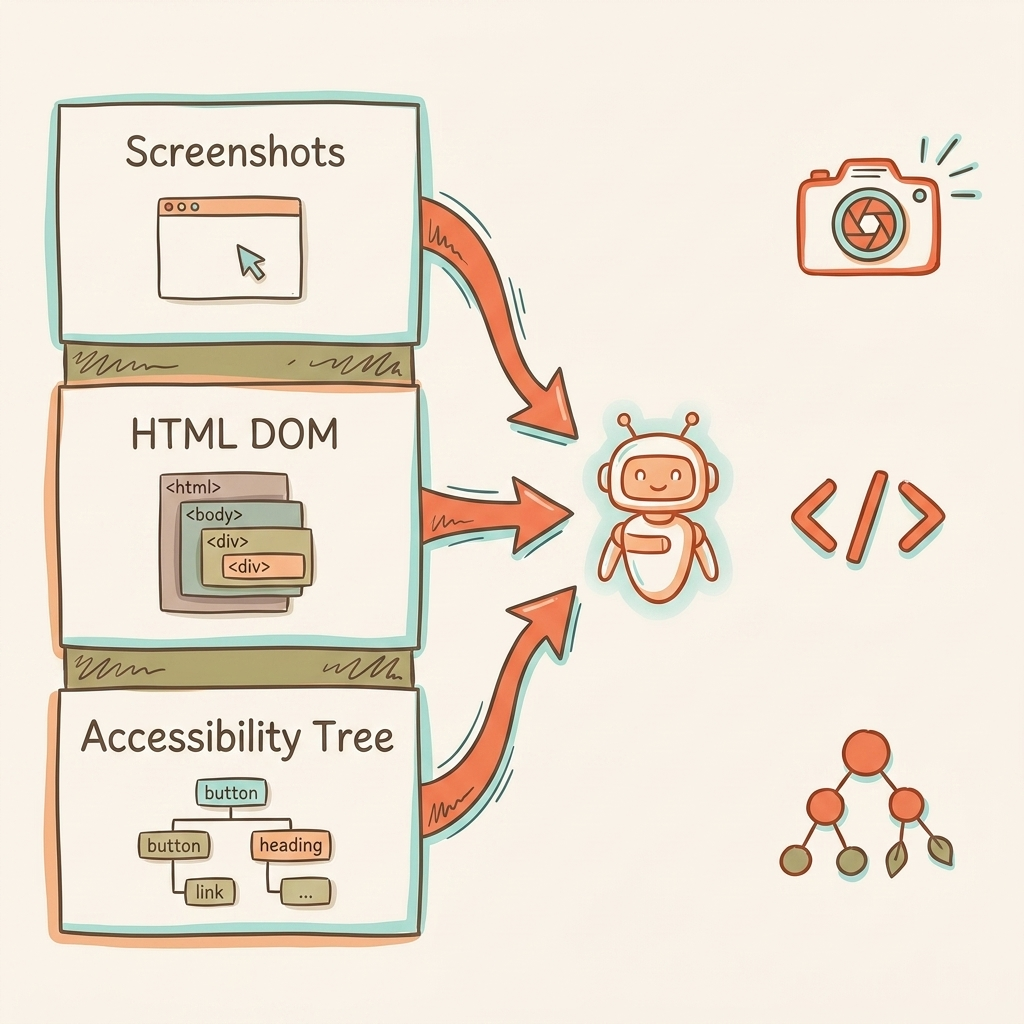
That definition matters because it's broader than "accessible." Accessibility ensures humans using assistive technology can navigate your site. Agent-friendly design ensures autonomous AI systems can do the same, and they perceive your site through three completely different channels.
How Agents See Your Site
Screenshots and vision models. Agents capture rendered pages and analyze them with vision models. Color, size, spacing, and visual hierarchy all become input signals. If a button blends into the background or text is too small, the agent might skip it entirely. This approach is slow and token-expensive, so agents don't rely on it alone.
Raw HTML and DOM parsing. Agents read the DOM directly: element nesting, IDs, classes, data attributes. This gives them structural context that screenshots miss. A <div> styled to look like a button tells the agent nothing. A <button> tag tells it everything.
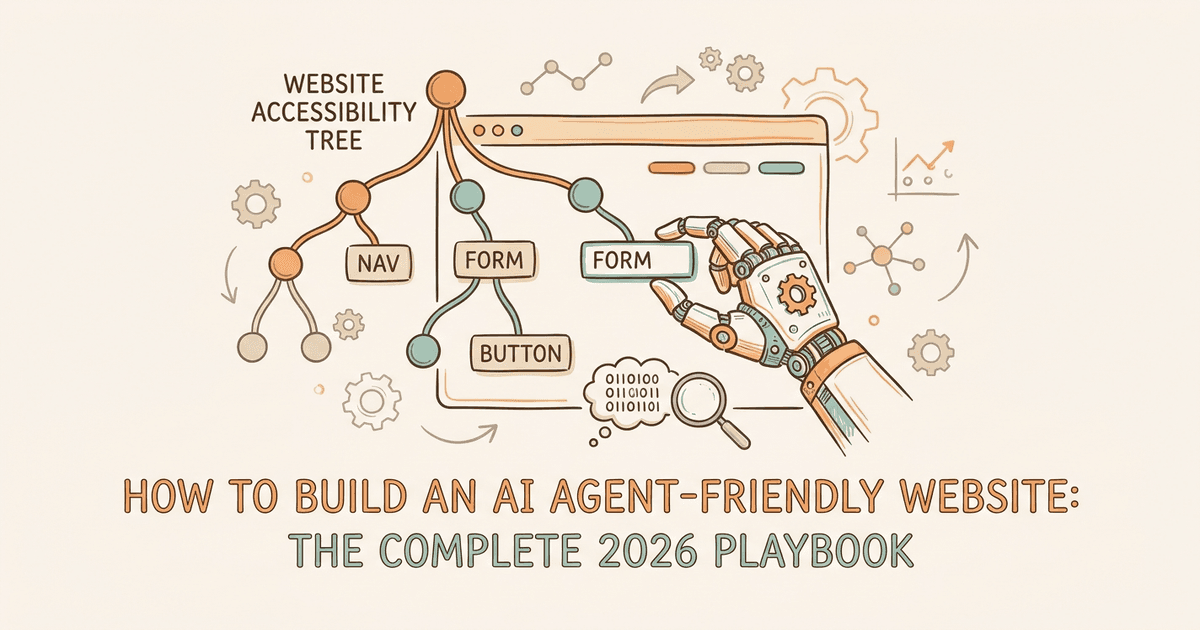
The accessibility tree. This is the critical one. The accessibility tree is a browser-native API that distills the DOM into roles, names, and states of interactive elements. It ignores CSS noise and focuses on pure utility. For agents, it's a high-fidelity map of what your site can do.
Modern agents combine all three. They use the DOM and accessibility tree for structured element lists, then layer in visual rendering for layout context. A site can look perfect to humans and be completely broken for agents if the accessibility tree is empty or mislabeled.
Google's own web.dev guide puts it bluntly: "Many websites are designed beautifully for humans, with complex hover-states, shifting layouts, and fluid motion. This is functionally broken for agents."
The CHI 2026 research from UC Berkeley and University of Michigan quantifies the cost: 78% task success on accessible sites, 42% on inaccessible ones. That's a 36-point gap in agent effectiveness based entirely on how your site is built.
For a deeper look at how different AI products process your content, see our breakdown of how AI models read websites.
What Are Google's 7 Rules for Agent-Friendly Websites?
See where you rank across all AI answer engines.
Enter your domain and we'll scan your citation rate across ChatGPT, Perplexity, and Google AI.
Prefer to talk? Book a free 30-min call
Google's web.dev recommends seven fixes: stable layouts, semantic HTML, cursor pointer signals, label-input linking, minimum element sizes, no ghost overlays, and visible state changes on user actions.
These seven rules map directly to existing WCAG accessibility criteria. One audit covers both human accessibility and agent accessibility.
| Rule | What It Means | What Breaks for Agents | WCAG Mapping |
|---|---|---|---|
| 1. Visible state changes | Actions produce observable interface changes | Agent can't confirm if action succeeded | WCAG 3.2 |
| 2. Stable layout | Elements stay in consistent positions | Vision model loses track between screenshots | WCAG 2.4.3 |
| 3. No ghost overlays | No transparent elements covering interactive content | Agent sees clickable area but click hits the overlay | , |
| 4. Semantic HTML | Use <button>, <a>, <nav> instead of styled <div> |
Accessibility tree shows no interactive roles | WCAG 4.1.2 |
| 5. Cursor pointer | Set cursor: pointer for interactive elements |
Vision model misses actionability signal | WCAG 1.3.3 |
| 6. Linked labels | Connect <label> to <input> with for attribute |
Agent can't map visible text to form fields | WCAG 1.3.1 |
| 7. Minimum 8px size | Interactive elements larger than 8 square pixels | Visual analysis filters out anything smaller | WCAG 2.5.5 |
The Tailwind v4 Gotcha
Here's a detail most guides skip. Tailwind CSS v4 changed native button styling so buttons render with cursor: default instead of cursor: pointer. That means every Tailwind v4 project fails Google's Rule 5 out of the box.
The fix takes three lines:
@layer base {
  button:not(:disabled),
  [role="button"]:not(:disabled) {
    cursor: pointer;
  }
}
If you're running Tailwind v4, add this today.
What Google Didn't Say
Google framed all seven rules as suggestions ("consider following") with no confirmed ties to ranking or surfacing signals. But the data tells a different story. Sites that pass these accessibility-agent checks see higher recommendation rates from AI models because agents can actually complete tasks on them. We see this consistently across our client audits.
The checklist covers the HTML layer. But agents also need to find and access your site in the first place.
How Should You Configure Robots.txt and llms.txt for AI Crawlers?
Configure robots.txt to explicitly allow GPTBot, ClaudeBot, PerplexityBot, and OAI-SearchBot. Add llms.txt to give AI models a structured map of your most important pages and resources.
Most brands haven't touched their robots.txt since 2020. Meanwhile, nine AI crawler bots now scan the web, and the default configuration on many sites blocks them.
The 9 AI Crawlers You Need to Know
OpenAI (3 bots):
- GPTBot collects content for model training
- OAI-SearchBot powers ChatGPT's live web search
- ChatGPT-User fetches pages when users share URLs in chat
Blocking GPTBot does not block OAI-SearchBot. They're separate systems. You can block training crawls while still appearing in ChatGPT Search.
Anthropic (3 bots):
- ClaudeBot collects data for model pre-training
- Claude-User fetches pages in real time when users ask questions
- Claude-SearchBot indexes content for Claude's search results
Perplexity (1-2 bots):
- PerplexityBot powers the answer engine with live indexing
Google:
- Google-Extended handles Gemini training data only (separate from Googlebot)
The Blocking Problem
ClaudeBot is blocked by 69% of websites. GPTBot is blocked by 62%. These brands are invisible to AI by default.
Anthropic's crawl-to-refer ratio is 20,583:1. That means ClaudeBot crawls 20,583 pages for every single referral it sends back. OpenAI's ratio is 1,255:1. That context matters for deciding which crawlers to allow: the referral payoff from OpenAI's bots is significantly higher per crawl.
Recommended Robots.txt Configuration
User-agent: GPTBot
Allow: /

User-agent: OAI-SearchBot
Allow: /

User-agent: ChatGPT-User
Allow: /

User-agent: ClaudeBot
Allow: /

User-agent: Claude-User
Allow: /

User-agent: Claude-SearchBot
Allow: /

User-agent: PerplexityBot
Allow: /

User-agent: Google-Extended
Allow: /

User-agent: CCBot
Disallow: /

User-agent: Bytespider
Disallow: /
We block CCBot (Common Crawl) and Bytespider (ByteDance). Bytespider has a documented history of ignoring robots.txt directives entirely.
llms.txt: The Content Map for AI Models
llms.txt is a plain-text Markdown file hosted at your site's root directory. It gives LLMs a structured map of your most important resources, similar to how robots.txt handles crawling permissions but focused on content discovery.
Claude's documentation endorses llms.txt. Adoption across the industry remains inconsistent. Some AI companies honor it, many don't check for it. But the cost of creating one is near zero, and the signal it sends is positive.
A basic llms.txt includes your site name, description, and links to key pages organized by category. Think of it as a README for AI models visiting your site.
How Does Schema Markup Boost AI Agent Comprehension?
Pages with structured data schema get cited 3.1x more often in AI Overviews. FAQPage schema drives 2.7x higher citation rates across AI search products.
If crawler access is about getting agents to your site, schema markup is about helping them understand what they find. Structured data gives AI models unambiguous context about your content, your business, and your expertise.
Priority Schema Types for AI Visibility
Not all schema types matter equally for AI agents. These six deliver the highest impact:
- Organization establishes entity identity (name, logo, social profiles, founding date). AI models use this to verify brand claims.
- FAQPage maps directly to the question-answer format LLMs prefer. The 2.7x citation lift comes from this natural alignment.
- Article signals content type, author, publish date, and topic. Helps models assess freshness and authority.
- HowTo provides structured steps that agents can extract and present as standalone answers.
- Product covers price, availability, and reviews. Critical for ecommerce AI search optimization.
- Review/AggregateRating adds social proof signals that LLMs use when comparing options.
We cover implementation details in our schema markup for AI visibility guide.
The NLWeb Connection
Microsoft's NLWeb protocol uses Schema.org data you already publish, combined with RSS feeds, to make your site queryable by AI agents. Every NLWeb instance doubles as an MCP (Model Context Protocol) server. That means your schema investment pays dividends across both traditional SEO and the emerging agent ecosystem.
One Honest Caveat
Claude's content pipeline strips JSON-LD, meta descriptions, and schema markup during processing. Schema helps with Google, Perplexity, and ChatGPT, but Claude can't see it. We detail each model's processing pipeline in our guide to how AI models read websites.
What Are WebMCP, NLWeb, and the Emerging Agent Protocols?
WebMCP, NLWeb, and A2A are emerging protocols that turn websites into structured tools AI agents can interact with directly, beyond reading static content.
This is the frontier layer. These protocols are early (some in Canary preview, others in open beta) but they signal where the web is heading. Understanding them now lets you prepare without overinvesting.
WebMCP (Google)
Google's Chrome team shipped WebMCP in early preview in February 2026. It turns website interactions into structured tools that agents can discover and use.
Two implementation paths:
- Declarative API: add HTML attributes to existing forms. Low effort, works for standard interactions.
- Imperative API: use JavaScript (
navigator.modelContext.registerTool()) for complex, multi-step workflows.
WebMCP is currently available in Chrome 146 Canary behind a feature flag. It's not production-ready, but the direction is clear: Google wants every website to be an agent-usable tool.
NLWeb (Microsoft)
Microsoft's NLWeb is an open-source framework that makes your site queryable by AI agents using data you already publish: Schema.org markup and RSS feeds. Every NLWeb instance is also an MCP server, publishing your content to the broader agent ecosystem.
The key advantage: if you've already implemented schema markup, NLWeb requires minimal additional work. Cloudflare has even built native NLWeb support into their AI Search product.
A2A (Agent-to-Agent Protocol)
Google's A2A protocol lets agents discover and communicate with each other through well-known URLs serving Agent Cards (/.well-known/agent-card.json). This is most relevant for businesses building their own AI agents and less so for content-focused sites.
What Matters Right Now
Google published six protocols total: MCP, A2A, UCP, AP2, A2UI, and AG-UI. Content-focused sites need to care about two: MCP (data access) and A2A (discoverability). The rest (commerce, payments, UI rendering) are relevant for transactional platforms.
Don't rebuild your site for protocols in Canary preview. Do ensure your Schema.org markup is solid (it's a prerequisite for NLWeb), and join the Chrome Early Preview Program to stay informed.
The AI Agent-Friendly Website Audit: A Tiered Action Plan
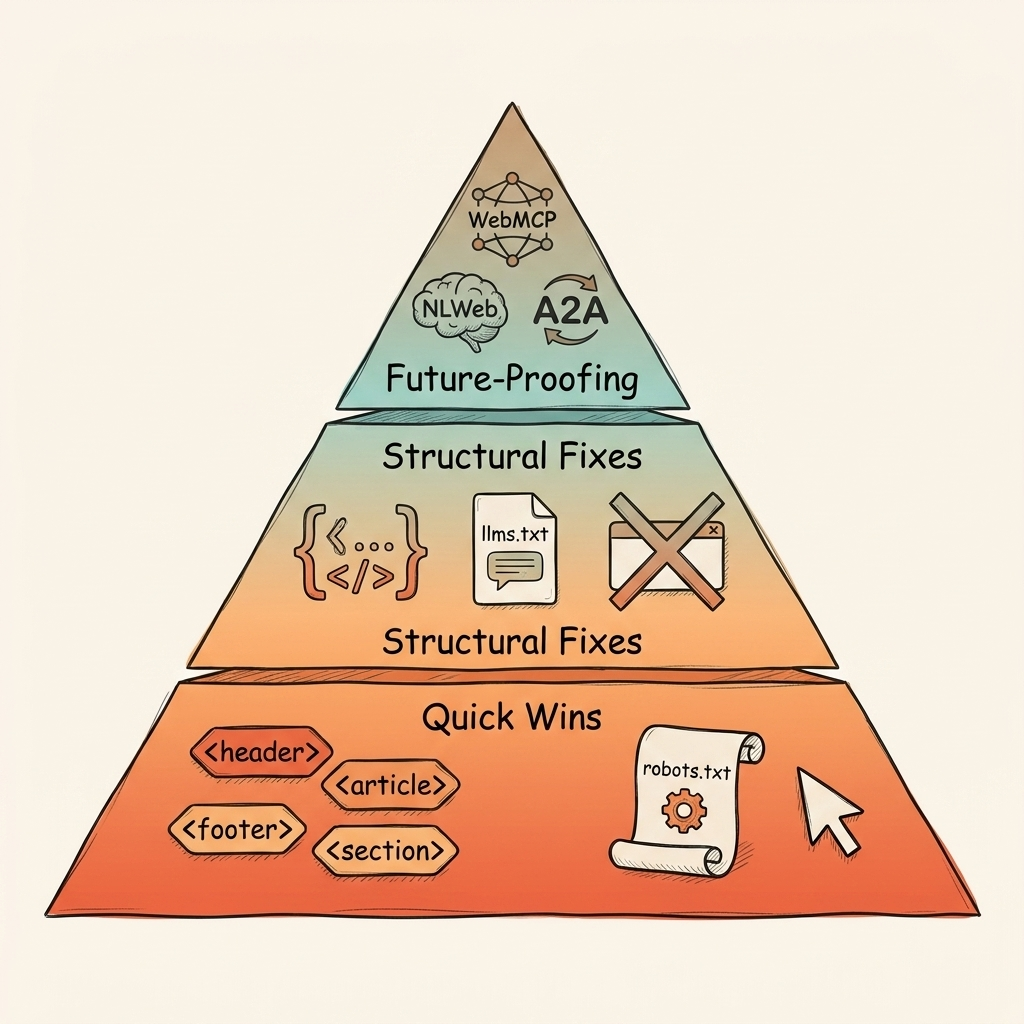
Start with semantic HTML and robots.txt fixes this week. Add schema markup this month. Monitor WebMCP and NLWeb over the next quarter.
Here's the full audit, organized by effort and impact.
Tier 1: This Week (Quick Wins)
These are zero-cost fixes you can knock out in a single afternoon:
- Audit your accessibility tree. Open Chrome DevTools, then the Accessibility tab. Check that every interactive element has a role, name, and state. If buttons show up as generic
<div>elements, that's your first fix. - Fix semantic HTML. Replace styled
<div>and<span>elements with<button>,<a>,<nav>,<label>, and<select>. These work correctly by default for both assistive technology and AI agents. - Add cursor:pointer CSS. Especially if you're on Tailwind v4. Three lines of CSS, covered in the section above.
- Update robots.txt. Add explicit
Allow: /directives for all nine AI crawler bots. Block CCBot and Bytespider. - Remove ghost overlays. Audit for transparent elements sitting on top of buttons and links. Cookie banners and modal backdrops are common offenders.
Tier 2: This Month (Structural Fixes)
These require dev time but deliver the 3.1x citation impact:
- Implement priority schema. Add JSON-LD for Organization, FAQPage, Article, and HowTo. Start with your homepage and highest-traffic pages.
- Create llms.txt. Write a plain-text Markdown file for your root directory. List your key pages, products, and resources.
- Fix label-input wiring. Every
<label>needs aforattribute matching its<input>ID. Run an automated audit with axe or Lighthouse. - Ensure minimum interaction targets. All buttons and links should exceed 8×8 pixels. Mobile-first designs usually pass this, but verify.
Tier 3: This Quarter (Future-Proofing)
These are watch-and-prepare actions:
- Join the Chrome WebMCP Early Preview Program. Get access to documentation and demos before the feature graduates from Canary.
- Evaluate NLWeb. If your Schema.org markup is already solid, NLWeb setup is minimal. Cloudflare customers can enable it directly.
- Monitor A2A. If you're building customer-facing AI agents, A2A discoverability matters. For content-only sites, it's optional for now.
Frequently Asked Questions About AI Agent-Friendly Websites
These are the questions we get most often from brands optimizing their websites for AI agent compatibility.
Is agent-friendly design the same as web accessibility?
Agent-friendly design starts with accessibility but extends into crawler configuration, structured data, and emerging protocols like WebMCP and NLWeb. Think of accessibility as layer one of a five-layer stack.
The WCAG criteria overlap significantly with Google's 7 agent-friendly rules. But accessibility standards say nothing about robots.txt configuration, llms.txt, or schema markup, all of which affect how AI models discover and understand your content.
Does making my site agent-friendly improve Google rankings?
Google has not confirmed ranking signals tied to agent-friendly design specifically. But the overlap with accessibility (which is a ranking factor) and schema markup (which drives rich results and AI Overview appearances) means the work benefits traditional search too. We've seen consistent correlation between AEO-optimized sites and higher placement in AI-generated answers.
Which AI crawlers should I allow in robots.txt?
Allow GPTBot, OAI-SearchBot, ChatGPT-User, ClaudeBot, Claude-User, Claude-SearchBot, PerplexityBot, and Google-Extended for maximum visibility. Block CCBot if you want to opt out of Common Crawl training data, and block Bytespider due to its non-compliance history.
Do I need to implement WebMCP now?
Not yet. WebMCP is in Chrome 146 Canary behind a feature flag as of February 2026. It's directionally important but not production-ready. Prioritize semantic HTML, schema markup, and crawler configuration first. Those deliver measurable results today.
How do I test if my site is agent-friendly?
Open Chrome DevTools and navigate to the Accessibility tab to inspect your site's accessibility tree. Every interactive element should have a clear role (button, link, input), a name, and a state. Then run Lighthouse or axe to catch WCAG violations. Finally, check your robots.txt to confirm AI crawlers aren't blocked.
Conclusion
An AI agent-friendly website isn't a single fix. It's a five-layer stack:
- Layer 1: HTML foundations. Semantic tags, stable layouts, accessible interactive elements.
- Layer 2: Crawler access. Robots.txt configured for nine AI bots, llms.txt as a content map.
- Layer 3: Structured data. Schema.org markup driving 3.1x more AI citations.
- Layer 4: Agent protocols. WebMCP, NLWeb, and A2A turning sites into structured tools.
- Layer 5: Prioritized execution. Quick wins this week, structural fixes this month, protocol readiness this quarter.
Google's 7-rule checklist covers layer one. That's the starting floor, not the finish line. The brands pulling ahead in AI visibility are building the full stack and seeing the results in higher recommendation rates from ChatGPT, Perplexity, and AI Overviews.
Your first step takes five minutes. Open Chrome DevTools, check your accessibility tree, and see what agents actually see when they visit your site. If interactive elements lack roles and names, you've found your starting point.
Want a full audit? Book a free strategy call and we'll map out your AI agent readiness alongside your broader AI visibility strategy.
See where your brand appears in AI search
Scan ChatGPT, Perplexity, and Google AI across buyer-intent queries, instantly, no sign-up.
Find out if AI is sending buyers to your competitors.
We audit your AI visibility across ChatGPT, Perplexity, and Google AI –and show you exactly where you rank and what to fix.
“We went from 200 visitors/day to 1,900 visitors/day and 40% of demos are from AI search.”
Sumanyu Sharma · CEO, Hamming.ai
“Cintra helped me go from 3k to 7.5k daily traffic and doubled weekly orders in 1.5 months.”
Russ Coulon · Owner, UV Blocker
“We saw a lift from 3% to 13% visibility in the first 2 weeks, and organic traffic hit its highest ever.”
Ash Metry · Founder, Keywords.am
Related Articles
AI Citation Decay: Why Your AI Visibility Drops Every 4.5 Weeks
AI citation decay erodes your brand's presence in AI answers with a 4.5-week half-life. Learn platform-specifi…
Product Feed Optimization AI Shopping Engines Actually Read (10-Point Audit)
Product feed optimization AI shopping engines need to recommend your products. Platform-by-platform feed requi…
Organic Traffic Decline 2026: Why It's Dropping and How to Recover
Organic traffic decline 2026 is real. AI Overviews cut clicks 38% on triggered queries. Here's what's causing…